Timer
Function Description and Usage
The Timer block can delay incoming messages. In detail, the block has the following events:
a) Start or restart of the timer.
Starts the timer or restarts a running timer from the beginning.
An action (if configured) OnStartEvent is triggered each time.
The event trigger is defined via the conditions in OnStartEvent.conditions.
b) Cancel timer. A running timer is stopped based on an incoming message and the action OnCancelEvent is executed.
The event trigger is defined via the conditions in OnCancelEvent.conditions.
c) Timer Expired. A timer has reached the configured time span.
The event is only triggered by the timer and cannot be configured via conditions.
The event OnExpiredEvent is triggered when the corresponding action is executed.
The conditions have been replaced by the Condition Builder.
This is available in the following events:
OnStartEventOnCancelEvent
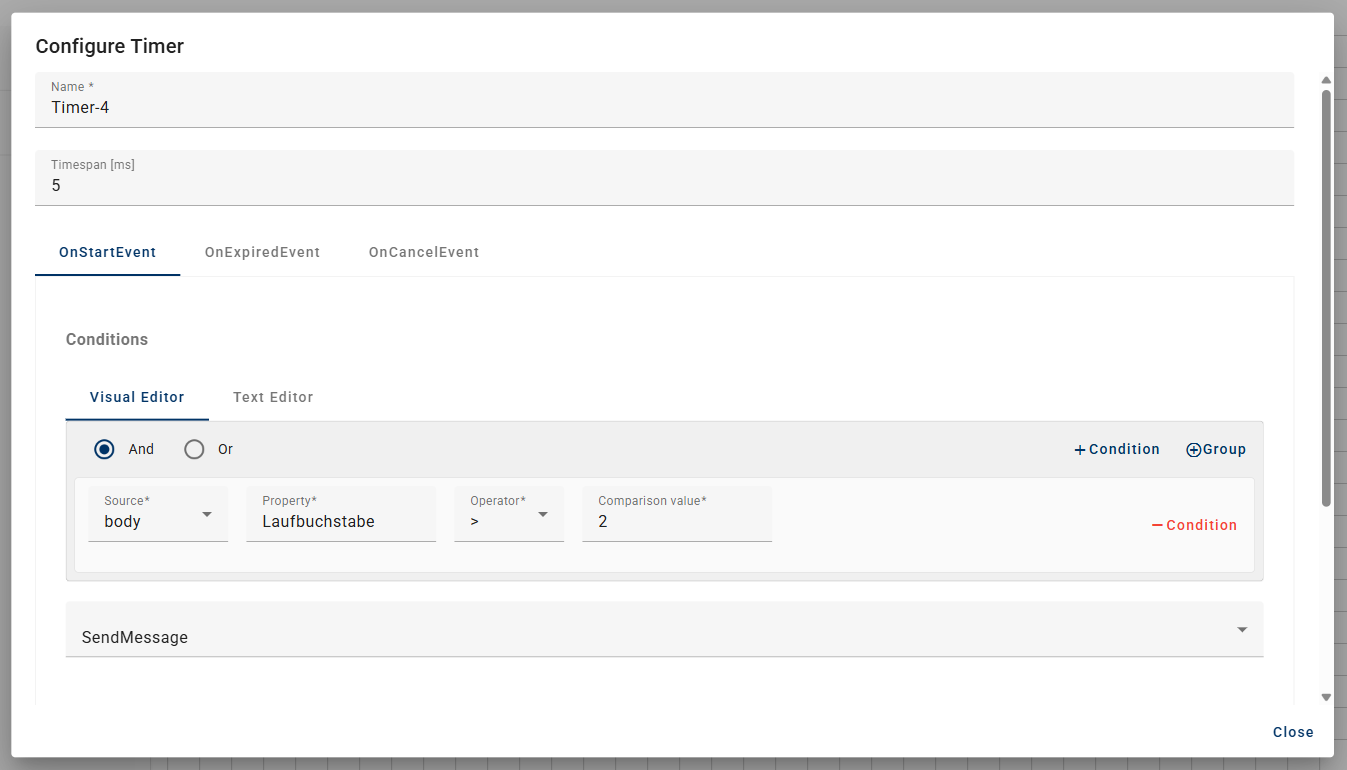
The Condition Builder enables configuration via the Visual Editor. The following values can be configured:
Source (header, body, context)
Property
Operator
Comparison value
The configured conditions are displayed in the Text Editor.
All specified conditions must be fulfilled (true) in order to receive/trigger the trigger/action.
Access to the message properties of the timer start message via body_<BODY_KEY> and header_<HEADER_KEY> is possible in the same way as in the RuleEngine and Router blocks.
The following options are available as an action on an event via the Type property:
SendMessage⇒ Send a predefined message. The message content is to be configured under Data.SendStartMessage⇒ Send the (complete) message that most recently caused the timer to start. Thetimestampof the message is updated upon sending.
If a timer is configured with identical conditions for Start and Cancel, for example, and these conditions are met upon message receipt, the timer will be started and immediately stopped again, and the associated actions will be executed.
The following table explains the configuration parameters of the Timer block.
| Parameter | Description |
|---|---|
Name | Name of the block instance. |
Into | Name of the block instance of the successor block to which output messages should be forwarded. Connected to successor blocks and output messages forwarded to the respectively specified block instances (names). |
Timespan(ms) | Time span for the timer in milliseconds |
Timer Configuration | The following events are present in the block:
The configurable actions OnStartEvent, OnCancelEvent and OnExpiredEvent only need to be configured if required and can be omitted if necessary. When one of the events occurs and a configured action exists, the current timestamp is added to the message body (and overwritten if applicable). For outgoing messages, the event can be identified via the header property timer-was: {started, canceled, expired} for further evaluation. |
Conditions | All expressions specified in this object must evaluate to true in order to execute the event. |
Name | User-defined name of the condition. The value can be freely chosen; there are no dependencies on other configuration parameters. |
Value | string, expression for evaluating the rule. For access to the properties of the associated start message, note the following: |
TimerType | The following options are available as an action on an event:
Note: If a timer is configured with identical conditions for Start and Cancel, for example, and these conditions are met upon message receipt, the timer will be started and immediately stopped again, and the associated actions will be executed. |
Header | Message body of the message to be sent for this event. |
Body | Message header of the message to be sent for this event. |
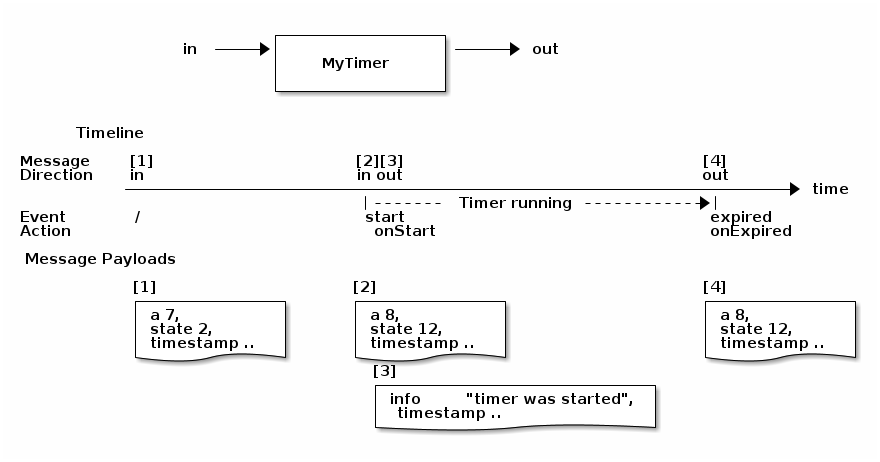
The following diagram shows an example scenario.
Message [1] arrives. It is ignored by the block because the timer condition (state >=10) is not fulfilled.
Message [2] arrives next and triggers the start, since state >=10 is met here. The timer starts and immediately sends out a message [3], which may be configured for debugging purposes.
The timer reaches the configured time of 20 seconds and sends message [4] at the output, which corresponds to message [2] with the current timestamp.
Example Configuration
The following figure shows an example configuration of the Timer block in the RoboGate Edge UI.