Expression
Function Description and Usage
The Expression Evaluator block (ExpEval) can perform calculations and other mathematical or logical operations based on incoming messages. The processing block has access to incoming message payloads.
The following diagram illustrates how it works.
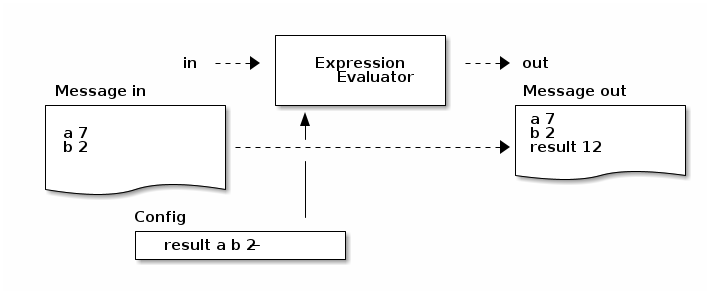
In the example shown in the diagram, the calculation of a value result is performed according to the configuration.
For this purpose, the incoming data fields a and b are accessed. After processing, the incoming message is extended with the value result and output.
The following table explains the configuration parameters.
| Parameter | Description |
|---|---|
Name | Name of the block instance. |
Into | Name of the block instance of the subsequent block to which output messages should be forwarded. |
Expressions - Name | Name of the result (key) for a specified expression. |
Value | string, Expression to be evaluated. The syntax is described under Expressions. |
Preserve input properties | optional, boolean, default=false, |
Results in object | optional, string, If something is specified here, results are inserted into a sub-object of the output message. |
Expressions
The following operators and expressions are available and can be evaluated:
mathematical operations with the operators
+, -, *, /modulo with operator
%mathematical functions from .NET Math, e.g.
Round(..), Abs(..), Pow(..), Sqrt(..), ..binary operations with the operators
| , &, ^, ~logical operations with the operators
||, &&, or, and, !, notmathematical comparisons with the operators
<, >, <=, >=, ==, !=
In addition to numeric constants (such as 12 or 7.91) or boolean true/false, the properties of the incoming message can be accessed via JSON key.
The following table shows some examples.
| Expression (JSON Value) | Variables (from incoming message) | Result (JSON Value) |
|---|---|---|
"1.1*6" | 6.6 | |
"20 % 10" | 0 | |
"not true" | false | |
"true && true" | true | |
"true || false" | true | |
"not(2>8)" | true | |
"foo*bar" | foo:20; bar:4 | 80 |
"foo-bar" | foo:20; bar:4 | 16 |
"foo/bar" | foo:20; bar:4 | 5 |
"foo+bar" | foo:20; bar:4 | 24 |
"foo%bar" | foo:20; bar:4 | 0 |
"foo-(bar * 100)" | foo:20; bar:4 | -380 |
Note that this processing block has no state. Every calculation is performed based on the configuration and the incoming messages!
.Net Math Operations Syntax: The functions from dotnet math can be accessed as follows:
Exponentiation:
y = x^a⇒ "y": "Pow(x,a)"Rounding:
y = x (to two decimal places)⇒ "y": "Round(x,2)"Square root:
y = sqrt(x)⇒ "y": "Sqrt(x)"Round down to integer: x ⇒ "y": "Floor(x)"
Round up to integer: x ⇒ "y": "Ceiling(x)"
Absolute value of a number: x ⇒ "y": "Abs(x)"
Further details can be found in the documentation of the Math class in .Net Core: https://docs.microsoft.com/de-de/dotnet/api/system.math.sqrt?view=netcore-3.1
Using Regular Expressions (Regex)
Regular expressions can be used to create more complex search patterns — for example, not just a single number (e.g. 42), but an entire range (e.g. 00-99).
The syntax for regular expressions is: RegEx(<value>,'<pattern>'). The following special rules apply:
With single quotes ('') around the value, a static value can be entered
Without single quotes (''), the value is retrieved from the parameters (header & body & context)
For an expression that contains an empty string, the output is always False.
Example:
"HeaderScopeContainsSample" : "RegEx(header_scope, '.Sample.')"
Constants
The following constants are accessible:
PI⇒ the mathematical constant πEULER⇒ Euler’s number e, the base of the natural logarithmONE⇒ the integer 1
Time Conversion
Several functions are available for converting times:
| Function | Description |
|---|---|
DateTimeNowUtc() | Returns the current time of the Robogate in ISO format. |
ToDateTime(value,format) | Calculates a datetime object from a Unix epoch time, a string, or an OLE timestamp. |
DateTimeToString(value:datetime,format:optional string) | Inverse function of ToDateTime, which converts a datetime object back to a string. |
DateTimeToUnixEpoch(value:datetime) | Calculates the number of seconds since 1970-01-01 00:00 UTC from the datetime. |
DateTimeToNumber(value:datetime) | Calculates the number of days before or after midnight on December 30, 1899. The fractional component represents the time of that day divided by 24. |
The format follows the standard notation with format identifiers. Example: yyyy-MM-ddTHH:mm:ss.FFFFFFFK, and a concrete date would be 2023-02-08T17:05:54.355023Z. For further details see https://learn.microsoft.com/de-de/dotnet/standard/base-types/custom-date-and-time-format-strings.
Example for Time Conversion
In the following example, the difference between a time string and the current time is calculated:
"RemainingTime": "DateTimeToNumber(ToDateTime('2023-02-08T17:05:54.355023Z')) - DateTimeToNumber(DateTimeNowUtc())"
The datetime is first calculated from the string 2023-02-08T17:05:54.355023Z. The datetime is then formatted as a number and subtracted from the current time in numeric format (DateTimeNowUtc). This can be used, for example, to check whether the specified point in time is in the future (RemainingTime>0) or in the past (RemainingTime<0).
Example Configuration
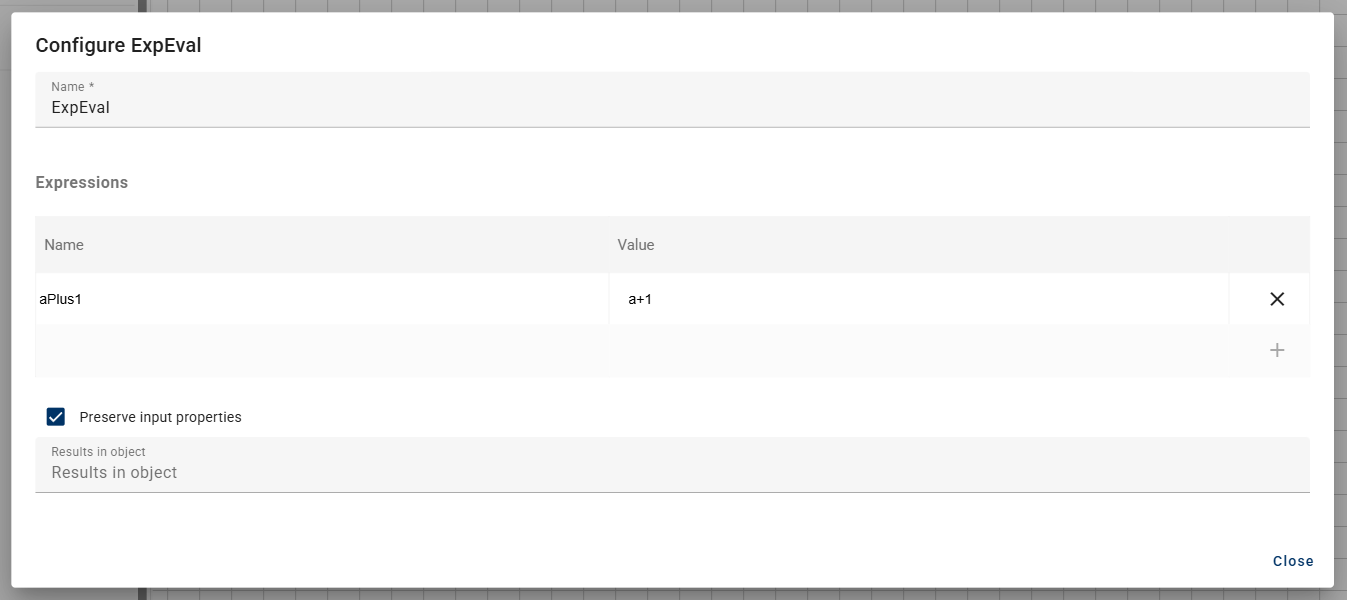
The calculation in the example in Figure 2 is derived from the field "a" of an incoming message, adding the constant value 1. The result is stored in the field "aPlus1". Furthermore, all existing fields on the input side should be retained (→ Preserve input properties: true). The result should be inserted directly into the top-level JSON object (→ Results in object: null).