EdgeMethod
Function Description and Usage
The Edge Method block (Edge Method Invocation) calls an Edge Method and forwards its result depending on the success to another processing or output block.
| Parameter | Description |
|---|---|
Name | Name of the block instance. |
Method | Name of the method to be called. |
Parameter | List of constant parameters for calling the method |
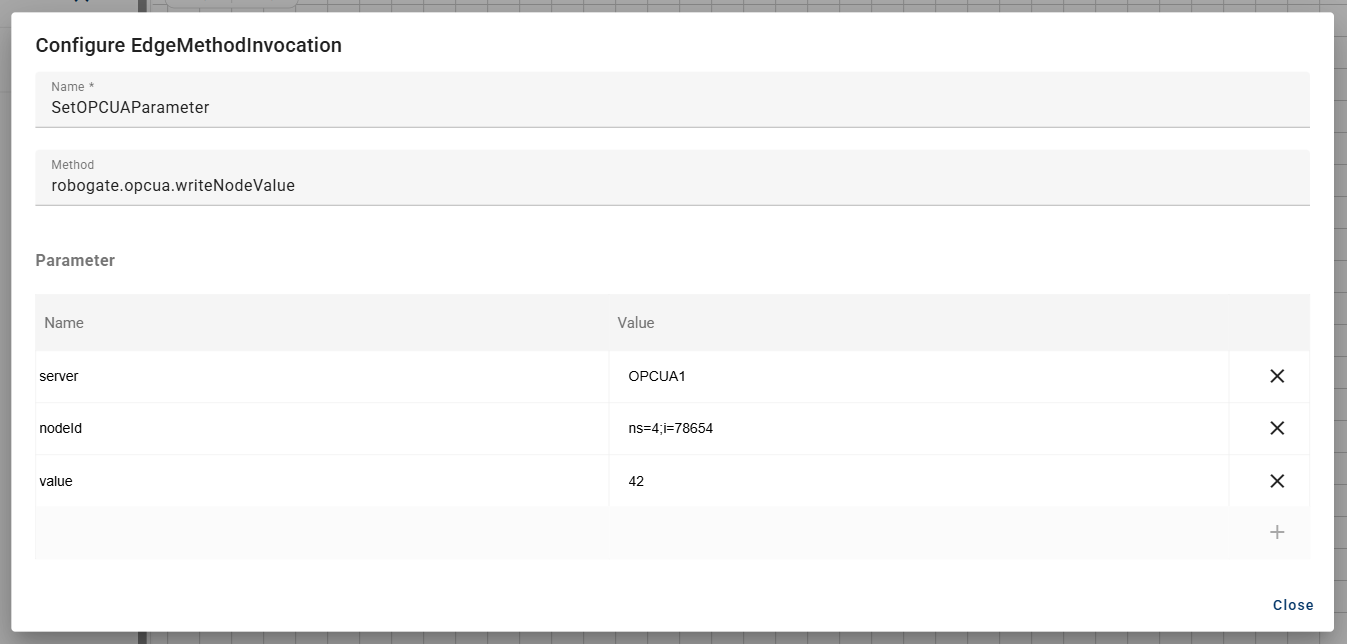
Example: Updating an OPC UA Node
In this example, an OPC UA Node is set as soon as a message triggers the block.
Frequently Used Methods
The following describes methods of the RoboGate Edge that are suitable for use together with the Edge Method block.
robogate.opcua.writeNodeValue
Method of the OPC UA module. Sets a node of a configured OPC UA server to a constant value.
| Parameter | Description |
|---|---|
server | Name of the configured server |
nodeId | Node ID of the node to be set |
value | Value of the node. This can also be set dynamically from a topic. To do this, a $ sign must be placed before the variable. For example $TOPIC_NAME. |
robogate.opcua.readNodeValue
Method of the OPC UA module. Reads the value of a node from a configured OPC UA server.
| Parameter | Description |
|---|---|
server | Name of the configured server |
nodeId | Node ID of the node to be set |
value | Value of the node |
Response message
| Property | Description |
|---|---|
val | Read value |
robogate.rfc1006.readSignal
Method of the RFC1006 module. Reads a value from a memory area of a configured PLC.
| Parameter | Description |
|---|---|
plc | Name of the configured PLC |
dataType | Memory type on PLC
|
dataBlock | Name of the DataBlock (for DataType DataBlock) |
startByte | Start byte of the value to be read in the memory area |
count | Number of bytes to be read from the memory area |
bit | Bit to be read within the byte to be read (for VarType = Bit) |
varType | Data type to which the read value should be converted
|
Response message
| Property | Description |
|---|---|
value | Read value |
robogate.rfc1006.writeSignal
Method of the RFC1006 module. Writes a value to a memory area of a configured PLC.
| Parameter | Description |
|---|---|
plc | Name of the configured PLC |
dataType | Memory type on PLC
|
dataBlock | ID of the DataBlock |
startByte | Start byte of the value to be read in the memory area |
varType | Data type to which the read value should be converted
|
value | Value to be written |
modbus-testread
Method of the Modbus module. Reads a value from a configured Modbus slave.
Parameter | Description |
serverInstance | Name of the configured Modbus |
slaveId | ID of the slave to be read in the Modbus |
functionCode | Modbus Function Code
|
registerStartAddress | Start address of the memory area to be read |
registerLength | Length of the memory area to be read in words (2 byte) for function codes 3 and 4 |
type | Data type to which the read value should be converted
For function codes 1 and 2: Bool, length 1 |
valueGain | Constant factor of the read value to obtain the correct value (default: 1.0) |
valueOffset | Constant offset of the read value to obtain the correct value (default: 0.0) |
isLittleEndian | If true, interprets the first read byte as the least significant byte when reading the value. (Default: false ⇒ big-endian) |
Response message
| Property | Description |
|---|---|
resultCode | Result code ("Ok" or "Error") |
data.Variable | Read value |
robogate.set_led
This method is only available on RoboGate devices powered by Turck. Configures the blinking behavior of an HMI LED on the device.
| Parameter | Description |
|---|---|
name | Name of the LED
|
modus | Blink mode
|
robogate.opcua.triggerReadGroup
This method enables a re-read of an OPC UA poll group. This can be used, for example, to only read an OPC UA group under certain conditions, which can help reduce CPU load.
| Parameter | Description |
|---|---|
server | Name of the configured server |
name | Name of the OPC UA group to be triggered |
Note: the module itself only triggers the specified group. The module only outputs status information about whether the action was successful. See also the figure.
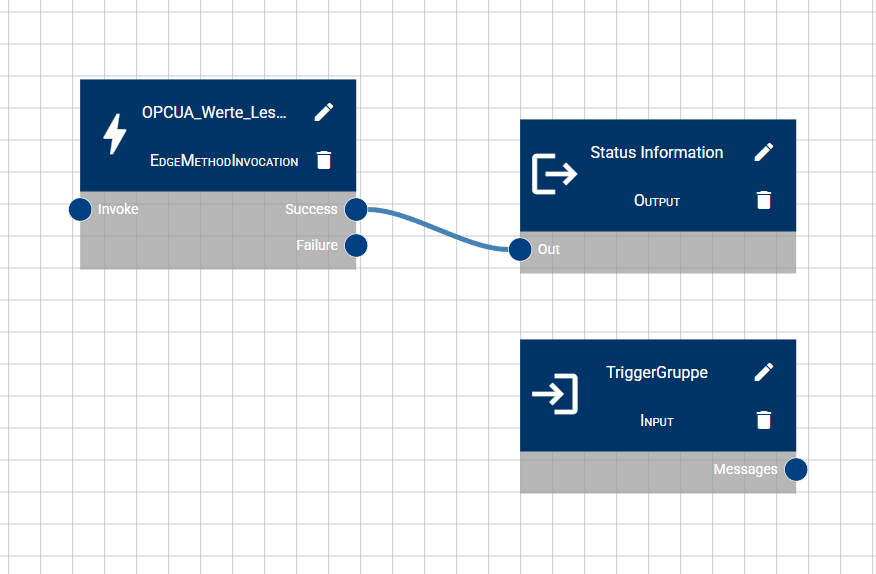
If the group should respond exclusively to the trigger and not to regular polling, the polling of the respective OPC UA group must be set to 0 seconds.
robogate.opcua.callMethod
With the callMethod, OPC UA methods can be called. The following parameters must be specified:
| Parameter | Description |
|---|---|
server | Name of the configured server |
objectNodeid | NodeId for the object to be used |
methodNodeid | NodeId for the method to be used |
inputParameter | JSON with the input parameters ( "<PARAMETER NAME>": <VALUE>, "<PARAMETER NAME>": <VALUE>, … ) |
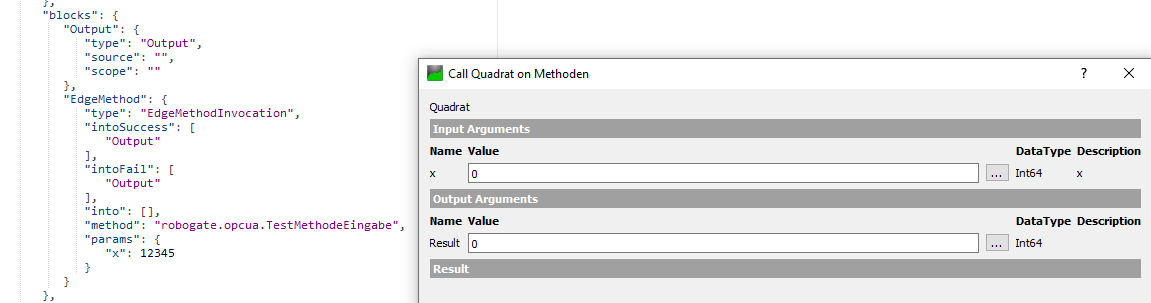
robogate.opcua.<OpuUA Methode>
This method is similar to the callMethod, but has the advantage that objectNodeid and methodNodeid do not need to be specified in the EdgeMethod. These have already been defined in the EdgeMapping of the OPC UA module. The method name for calling is also defined in the OPC UA module. The input parameter (in the example x) must correspond to the name on the OPC UA server. See the next figure.