
RoboGate RemoteService
The RoboGate RemoteService provides the ability to gain remote access to TCP-based services.
Via a local desktop client (RemoteService Client), connections to RoboGate Edges can be configured. The configured services are then virtually available on the user’s PC.
Prerequisites
Access to the service is possible via a TCP connection
On the service client, the "new" target IP (127.0.0.1) and, if necessary, the port can be configured
A RoboGate ControlCenter instance is available
A RoboGate Edge instance is available on the RoboGate Device in the target network
A RemoteService Client is installed on the service PC (user PC)
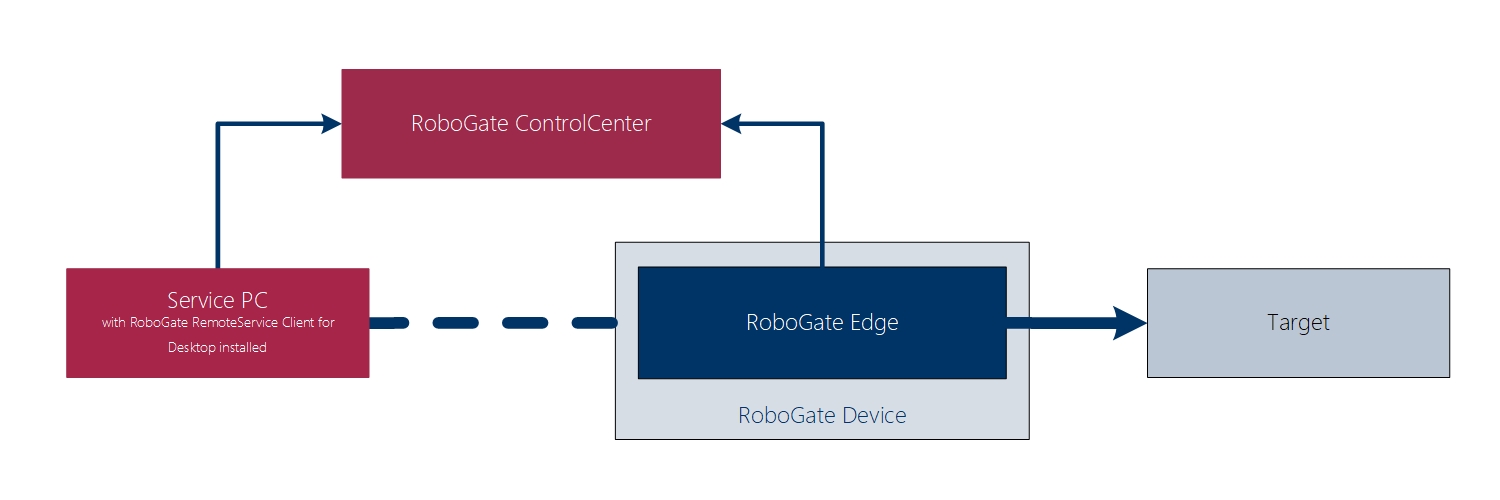
A connection consists of three sub-connections
RemoteService Client to ControlCenter
RoboGate Edge to ControlCenter
RoboGate Edge to Target
The target can also be located on the RoboGate Device itself.
The RoboGate ControlCenter acts as a rendezvous server for connections 1 and 2. This creates a virtual connection (hereinafter referred to as tunnel) between the service PC and the target (shown in grey in the figure above).
Licensing
An additional license is required for remote access from the Control Center to the RoboGate GUI.