
Identity & Access
The Identity & Access module allows users and their access rights to resources in the ControlCenter to be managed. Resources of the ControlCenter include the modules of the ControlCenter and their contents.
Users
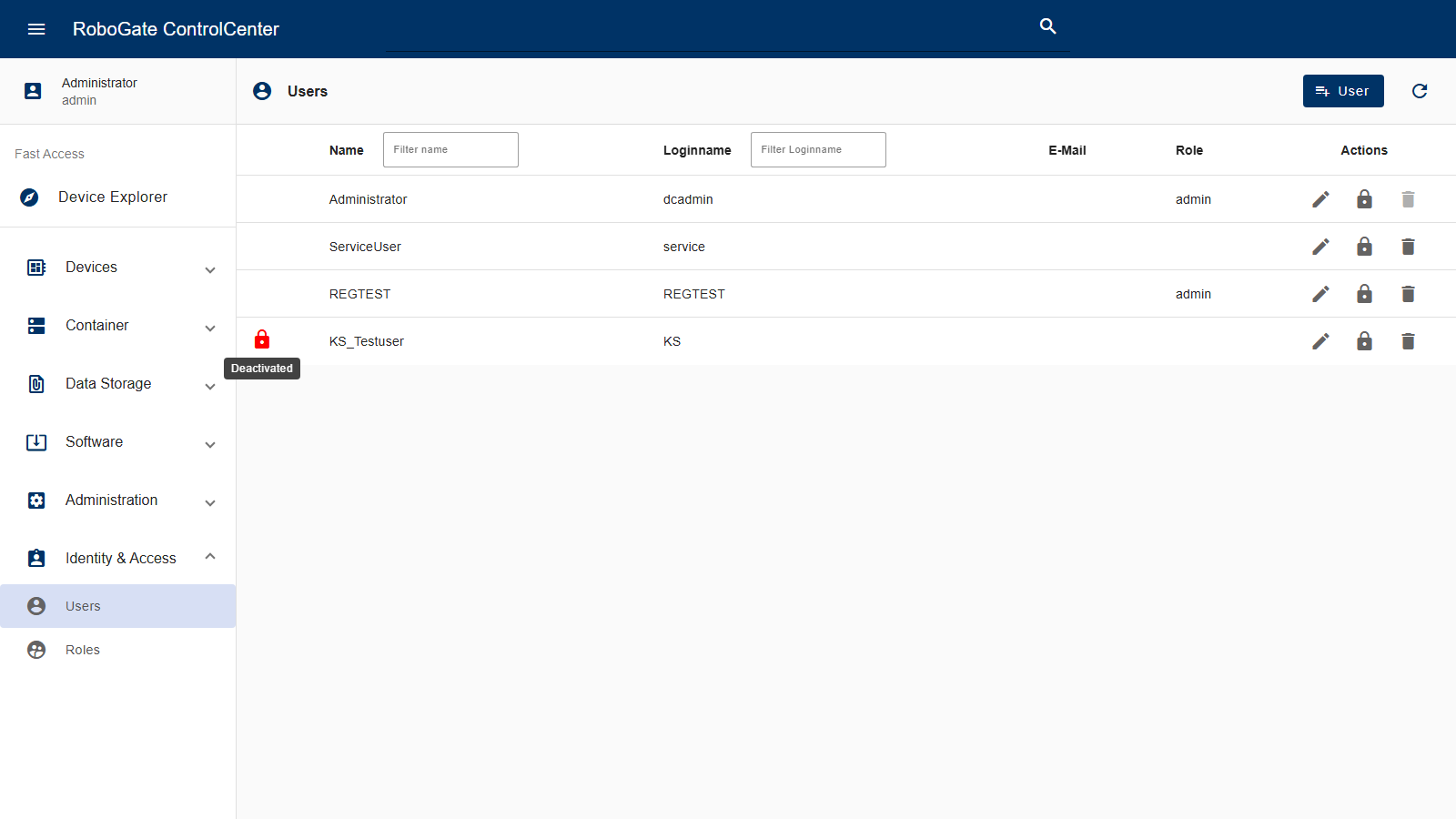
The Users section lists the existing users (Figure 1). New users can be created or the data of existing users can be modified.
Additionally, there is an icon (at the beginning of each row) that shows the "activated/deactivated" status per user. A tooltip is shown on the icon.
Create a User
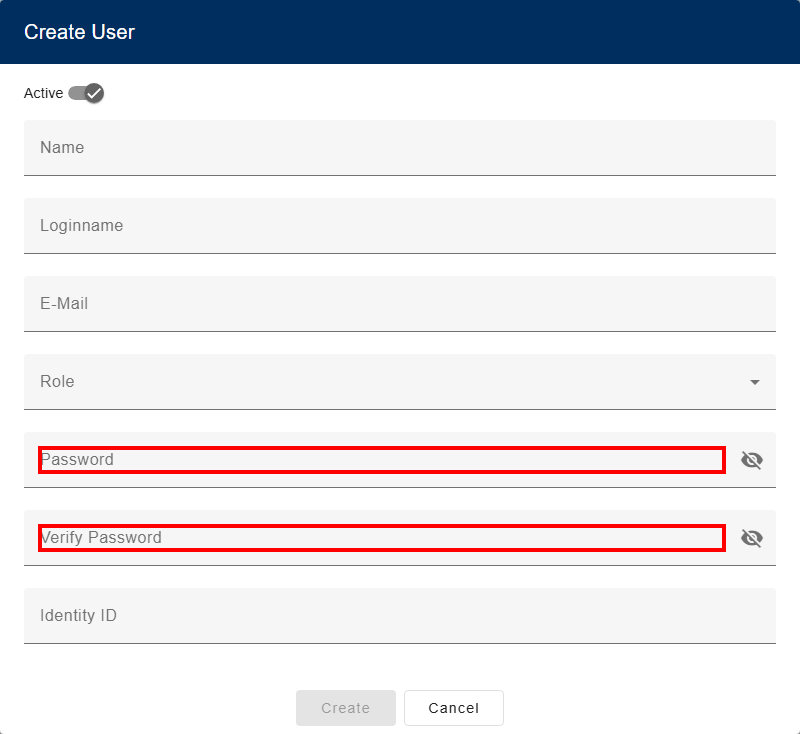
To create a new user, click the "Create New" button. After entering the data and selecting a role, click "Create" (Figure 2). The new user is then stored in the system. The password field is not mandatory. In the top left there is a toggle to activate or deactivate the user.
Edit a User
To modify the data of an existing user, click the pencil icon  in the row of the corresponding user. The password can be reset via the lock button
 .
Delete a User
Users are deleted via the delete button  and confirmation of the delete request. The administrator set up by Robotron cannot be removed.
Roles
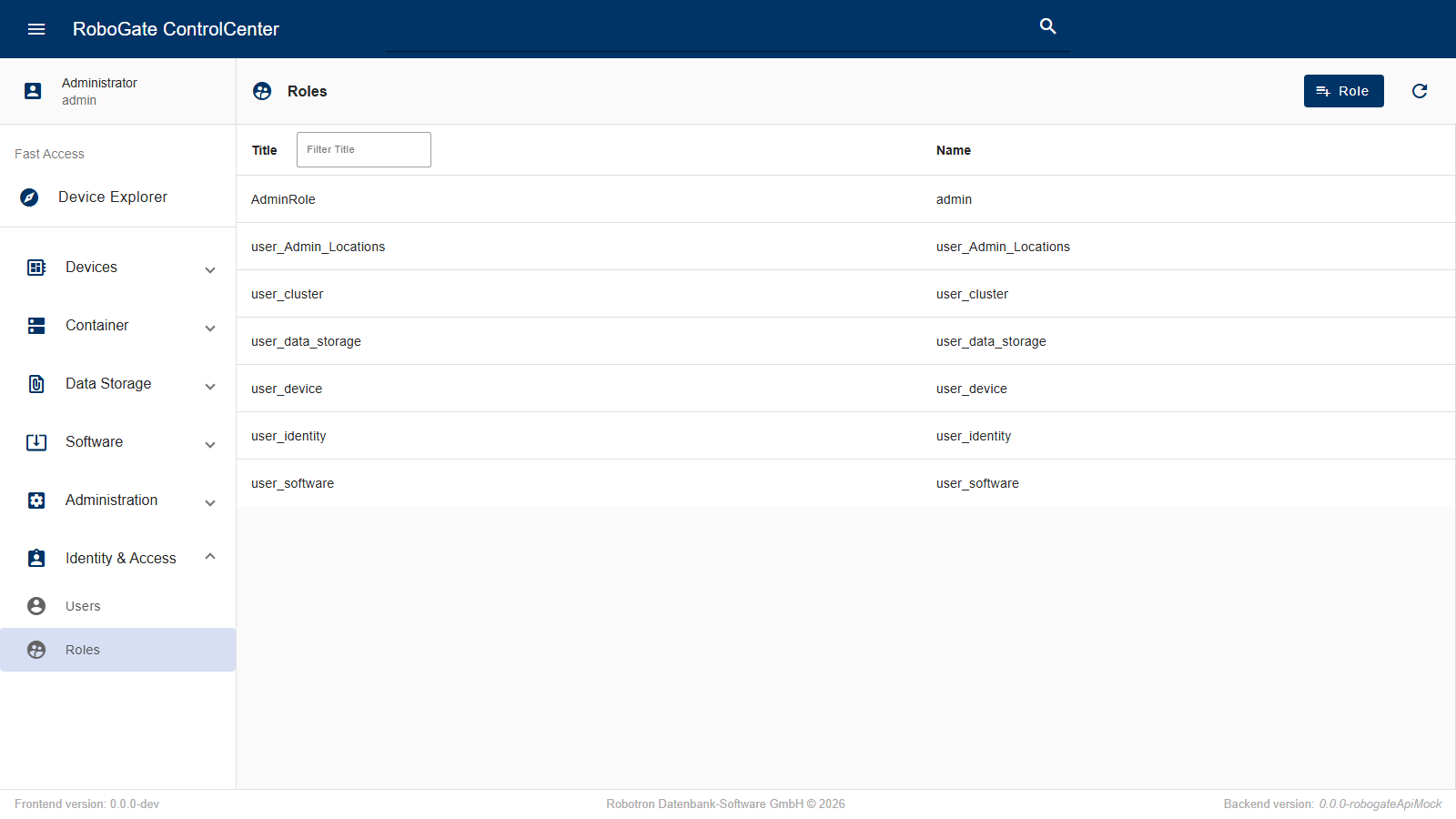
The Roles section lists the existing roles (Figure 3) and manages their access rights to resources in the ControlCenter. A user receives the access rights defined in a role when that role is assigned to them (in the Users section). This way users and permissions can be managed separately.
By default, the role AdminRole is created with access to all resources and assigned to the user Administrator.
Create a Role
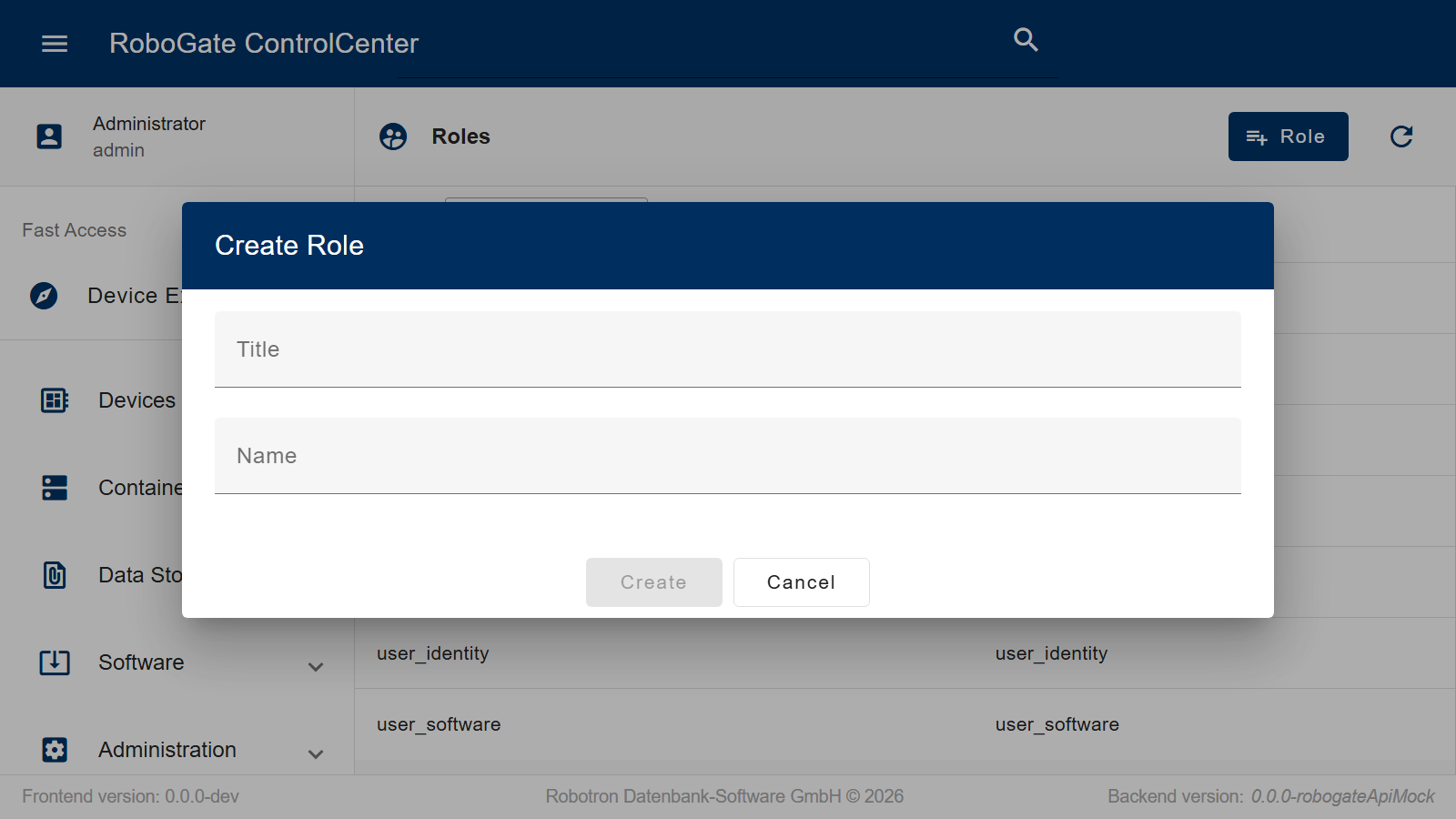
To create a new role, click the "Create New" button. After entering the name and optionally a title, click "Create" (Figure 4). The new role is then stored in the system.
Edit a Role
To edit data of an existing role, select it from the list and edit the corresponding data in the "Role Details" menu by clicking the pencil icon.
Delete a Role
To delete a role, select it from the list and click "Delete" in the three-dot menu of "Role Details".
Define Permissions
Roles can have read, create, update, and delete permissions for resources. For example, displaying groups in the Device Groups section requires a read permission for the resource rgdc:resource:device:group, creating groups requires a create permission, editing requires an update permission, and deleting requires a delete permission.
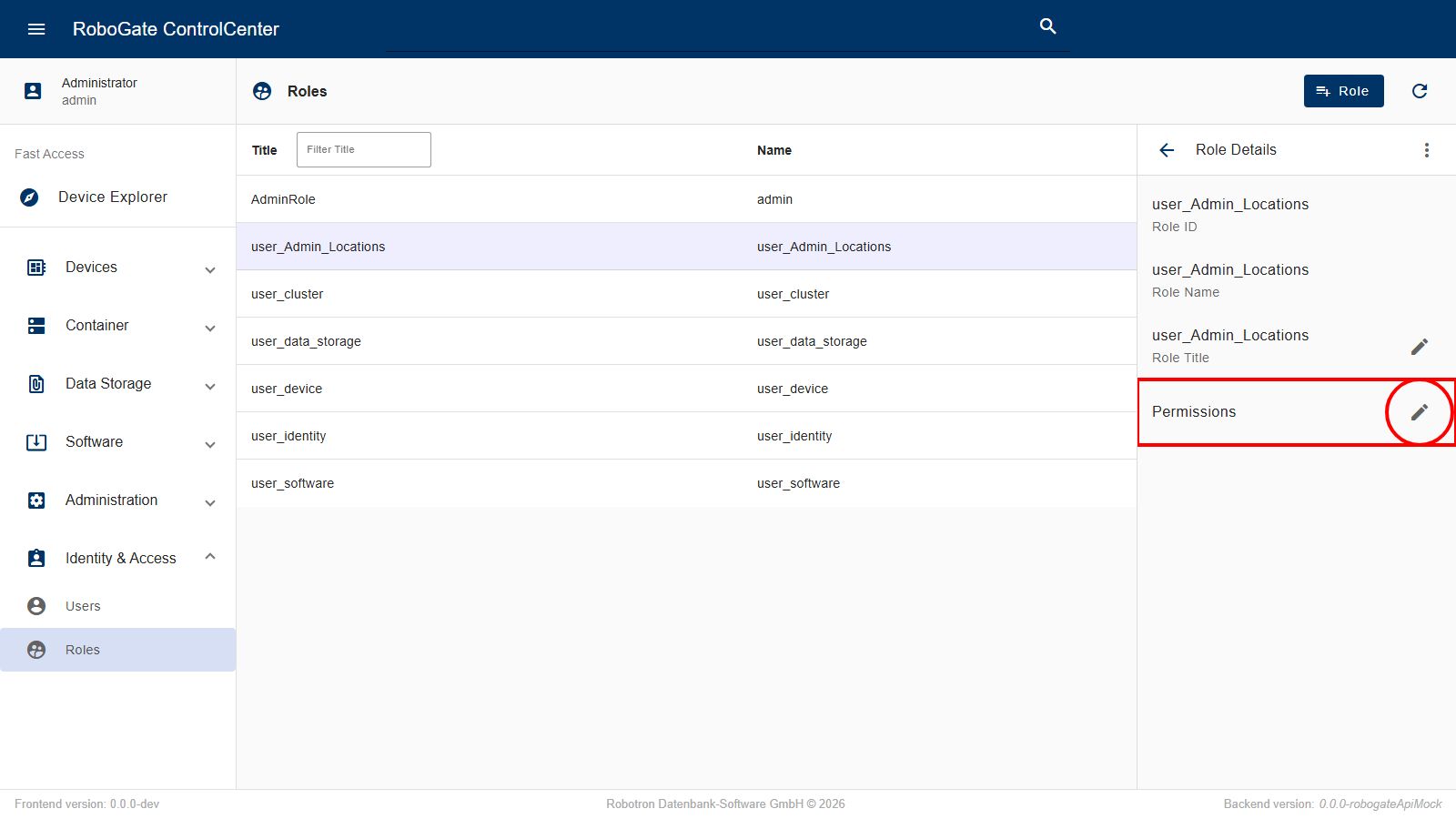
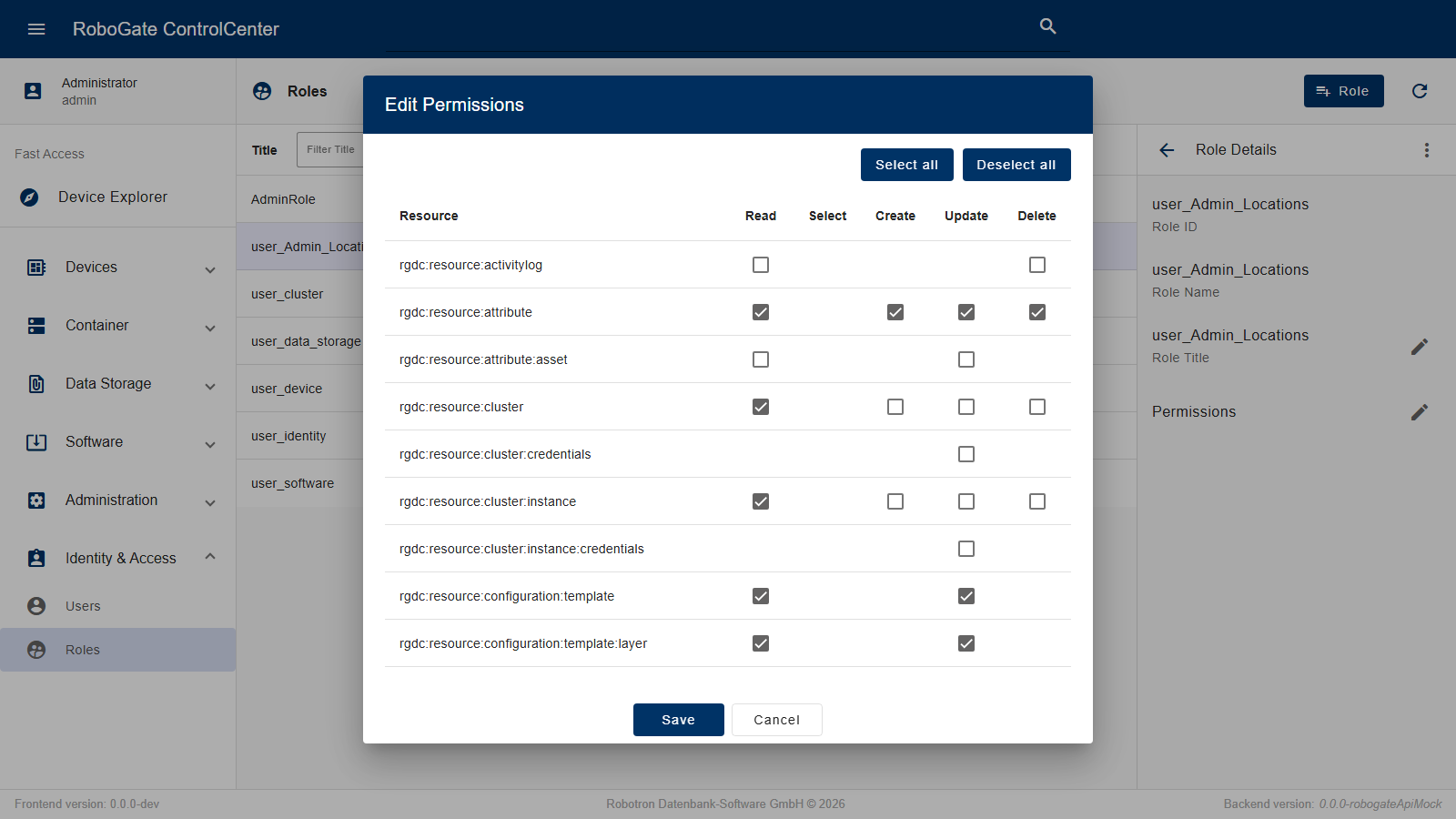
To define access rights for a role, select the corresponding role from the list and click the pencil icon in the "Permissions" section on the right (Figure 5). A window opens in which you can assign or remove permissions for the selected role (Figure 6). Click a checkbox in the row of the desired resource. A checkmark means the selected role has that permission over the resource; an empty checkbox means the role does not have that permission.
Depending on the access rights, the corresponding resources are shown or hidden in the ControlCenter user interface. If a user is not authorized to view a module, section, or attribute, that element is not displayed anywhere.
The administrator must not have any permissions revoked for security reasons.
The following tables list the required access rights for the respective UI elements per module.
| Module/Section | Element | Permission |
|---|---|---|
Devices | rgdc:resource:device: read OR rgdc:resource:enrollment:request: read OR rgdc:resource:device:group: read OR rgdc:resource:enrollment: read OR rgdc:resource:identity:registry: read | |
Explorer | rgdc:resource:device: read | |
Filter Locations | rgdc:resource:location: read | |
Filter Groups | rgdc:resource:device:group: read | |
Create New Button | rgdc:resource:device: create | |
Create Dialog | Location | rgdc:resource:location: read |
Attribute | rgdc:resource:attribute: read | |
Enrollment | rgdc:resource:enrollment: read | |
Identity | rgdc:resource:identity:registry:identity: read | |
Remove Button | rgdc:resource:identity:registry:identity: read AND rgdc:resource:identity:registry:identity: update | |
Assign Button | rgdc:resource:identity:registry:identity: read AND rgdc:resource:identity:registry:identity: update | |
Device Details | Delete Edit Button | rgdc:resource:device: delete |
Config Edit Button | rgdc:resource:device:configuration: read | |
Name Edit Button | rgdc:resource:device: update | |
Location Text | rgdc:resource:location: read | |
Location Edit Button | rgdc:resource:location: read AND rgdc:resource:device: update | |
Device Details | rgdc:resource:attribute: read AND rgdc:resource:attribute:asset: read | |
Add Button | rgdc:resource:attribute: update AND rgdc:resource:device: update AND rgdc:resource:attribute:asset: read | |
Device Details | rgdc:resource:enrollment: read | |
Assign Button | resource:enrollment: read AND resource:enrollment: update | |
Enable/Disable Toggle | resource:enrollment: read AND resource:enrollment: update | |
Unassign Button | resource:enrollment: read AND resource:enrollment: update | |
Device Details | rgdc:resource:device:group: read | |
Unassign Button | rgdc:resource:device:group: read AND rgdc:resource:device:group: update | |
Assign Button | rgdc:resource:device:group: read AND rgdc:resource:device:group: update | |
Device Details | rgdc:resource:identity:registry: read | |
Assign Button | rgdc:resource:identity:registry: read AND rgdc:resource:identity:registry: update | |
Device Configuration | Save Button | rgdc:resource:device:configuration: update |
Import Button | rgdc:resource:device:configuration: update | |
Export Button | rgdc:resource:device:configuration: read | |
Inbox | rgdc:resource:enrollment:request: read | |
Inbox | rgdc:resource:enrollment:request: read | |
Sync Button | rgdc:resource:enrollment:request: read | |
Inbox - Pending | Accept | rgdc:resource:enrollment:request: update |
Cancel | rgdc:resource:enrollment:request: update | |
Delete | rgdc:resource:enrollment:request: delete | |
Inbox - Accepted | Delete | rgdc:resource:enrollment:request: delete |
Inbox - Rejected | Delete | rgdc:resource:enrollment:request: delete |
Groups | rgdc:resource:device:group: read | |
Create Group Button | rgdc:resource:device:group: create | |
Device Group Details | Edit Name Button | rgdc:resource:device:group: update |
Edit Devices Button | rgdc:resource:device:group: update | |
Delete Group Button | rgdc:resource:device:group: delete | |
Enrollments | rgdc:resource:enrollment: read | |
Create New Button | rgdc:resource:enrollment: create | |
Import Button | rgdc:resource:enrollment: create | |
Active Status | rgdc:resource:enrollment: update | |
Assign | rgdc:resource:enrollment: update | |
Unassign | rgdc:resource:enrollment: update | |
Delete | rgdc:resource:enrollment: delete | |
Identity | rgdc:resource:identity:registry: read | |
Assign | rgdc:resource:identity:registry:identity: update | |
Unassign | rgdc:resource:identity:registry:identity: update | |
Refresh | rgdc:resource:identity:registry:identity: update | |
Assign New Button | rgdc:resource:identity:registry:identity: create AND rgdc:resource:identity:registry:identity: read AND rgdc:resource:device: read | |
Assign Device Identity Dialog - Device | rgdc:resource:device: read | |
Sync Identities Button | rgdc:resource:identity:registry:identity: read |
| Module/Section | Element | Permission |
|---|---|---|
Container | rgdc:resource:cluster: read | |
Hosts | rgdc:resource:cluster: read | |
Connect New Button | rgdc:resource:cluster: create | |
Location | rgdc:resource:location: read | |
Host Details | Create Instance | rgdc:resource:cluster:instance: create AND rgdc:resource:software:version: read AND rgdc:resource:software:version:type: read |
Delete Button | rgdc:resource:cluster: delete | |
Edit Name | rgdc:resource:cluster: update | |
Location Text | rgdc:resource:location read | |
Edit Location | rgdc:resource:cluster update AND rgdc:resource:location read | |
Instance Details | Start Button | rgdc:resource:cluster:instance update |
Restart Button | rgdc:resource:cluster:instance update | |
Stop Button | rgdc:resource:cluster:instance update | |
More Actions Button | rgdc:resource:cluster:instance delete | |
Delete Button | rgdc:resource:cluster:instance delete | |
Edit Name Button | rgdc:resource:cluster:instance update | |
Assign Enrollment Button | rgdc:resource:cluster:instance update AND rgdc:resource:enrollment update | |
Unassign Enrollment Button | rgdc:resource:cluster:instance update AND rgdc:resource:enrollment read AND rgdc:resource:enrollment update AND rgdc:resource:device read | |
Create EdgeContainer Dialog | Bundle | rgdc:resource:software:version: read AND rgdc:resource:software:version:type: read |
Version | rgdc:resource:software:version: read AND rgdc:resource:software:version:type: read | |
Device | rgdc:resource:software:device read |
| Module/Section | Element | Permission |
|---|---|---|
Software | rgdc:resource:software:rollout: read OR rgdc:resource:software:version read | |
Rollouts | rgdc:resource:software:rollout: read | |
Versions | rgdc:resource:software:version read AND rgdc:resource:software:version:type: read | |
Rollouts | Create Rollout Button | rgdc:resource:software:rollout: create AND rgdc:resource:device:group: read AND rgdc:resource:device: read AND rgdc:resource:software:version: read |
Device Group | rgdc:resource:device:group: read | |
Select Button | rgdc:resource:device: read | |
Software Versions | rgdc:resource:software:version: read | |
Versions | Import Version Dialog | rgdc:resource:software:version: create |
Create Rollout Button | rgdc:resource:software:rollout: create AND rgdc:resource:device:group: read AND rgdc:resource:device: read AND rgdc:resource:software:version: read |
| Module/Section | Element | Permission |
|---|---|---|
Administration | rgdc:resource:location: read OR rgdc:resource:attribute: read | |
Locations | rgdc:resource:location: read | |
Attributes | rgdc:resource:attribute: read | |
Locations | Create New Button | rgdc:resource:location: create |
Create Sub-Location Button | rgdc:resource:location: create AND rgdc:resource:location: update | |
More Actions Button | rgdc:resource:location: update OR rgdc:resource:location: delete | |
Move to Root Button | rgdc:resource:location: update | |
Delete Button | rgdc:resource:location: delete | |
Drag&Drop Tree | rgdc:resource:location: update | |
Edit Name Button | rgdc:resource:location: update | |
Attributes | Create New Button | rgdc:resource:attribute: create |
More Actions Button | rgdc:resource:attribute: delete | |
Delete Button | rgdc:resource:attribute: delete | |
Edit Title Button | rgdc:resource:attribute: update | |
Edit Description Button | rgdc:resource:attribute: update | |
Edit Unit Button | rgdc:resource:attribute: update |
| Module/Section | Element | Permission |
|---|---|---|
Identity & Access | rgdc:resource:iam: read | |
Users | rgdc:resource:iam: read | |
Roles | rgdc:resource:iam: read | |
Users | Create New Button | rgdc:resource:iam: create |
Edit Button | rgdc:resource:iam: update | |
Change Password Button | rgdc:resource:iam: update | |
Delete Button | rgdc:resource:iam: delete | |
Roles | Create New Button | rgdc:resource:iam: create |
Edit Title Button | rgdc:resource:iam: update | |
Change Permission Button | rgdc:resource:iam: update | |
Delete Button | rgdc:resource:iam: delete |